Showing posts with label trello. Show all posts
Tuesday, July 7, 2015
Trello Bytes5 - Life Experiences!
I use Trello. A lot. At work, at home, any possible way that I can use it, I do. And I preach (annoying, I know) the amazingness of Trello to everyone I meet. I have seven boards on my personal Trello account. Yes, you read that right. I have seven.
This is a short series of how I use Trello to over organize my life. Part 1, Part 2, Part 3, Part 4.
For my final post about how I use Trello, I'm going to tell you about my Life Experiences Board. This is a special board. An important board. It's my bucket list, my plan, it's how I want to live and experience life.
It's my dreams, my hopes. And I love being able to see them, laid out, the ones in progress, the ones that I've done, and the ones that I've got coming up.
Living life, just like I should.
**This is the last post in this series, I hope you enjoyed it! And one more reminder: I was not asked to write or compensated in any way by Trello for this series. I just love Trello that. much.**
Tuesday, June 30, 2015
Trello Bytes4 - Around the House!
I use Trello. A lot. At work, at home, any possible way that I can use it, I do. And I preach (annoying, I know) the amazingness of Trello to everyone I meet. I have seven boards on my personal Trello account. Yes, you read that right. I have seven.
This is a short series of how I use Trello to over organize my life. Part 1, Part 2, Part 3.
Like my personal projects board, there is a potential for a lot to be going on around my house. This board is where I keep my To Do list, grocery shopping lists, lists of things I plan to do to my house, and more. It's almost a catch all, but not quite.
I have a completely separate board for a major project I need to have done on my basement (yay, water issues!). Homeownership for the win!
I have another idea for a Trello plug in to auto create some (or all) of my perma cards that recur weekly, or monthly, but given the amount I'm trying to handle right now, it's just going to have to wait. I'll write about it here, if it happens.
**I was not asked to write or compensated in any way by Trello for this series. I just love Trello that. much.**
Tuesday, June 23, 2015
Trello Bytes3 - Personal Projects!
I use Trello. A lot. At work, at home, any possible way that I can use it, I do. And I preach (annoying, I know) the amazingness of Trello to everyone I meet. I have seven boards on my personal Trello account. Yes, you read that right. I have seven.
This is a short series of how I use Trello to over organize my life. Part 1, Part 2.
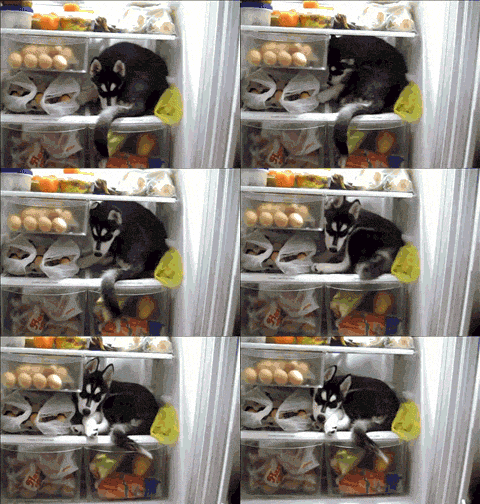
I have a lot of ideas, so much stuff I want to do. I am tracking four websites, an app, and two blogs. It seems like a lot of stuff to track in one board, but I needed to consolidate, because my number of boards was out. of. control. With the labels and some less than specific naming of columns, I am able to track all of my posts (I draft in the card descriptions), bugs, features, and things that are done or published. But some of this I want to keep private while I'm still working on it, so here is a cute gif of a husky (like Taco!) in the fridge instead of a screenshot of the board:
It's a system I refined frequently. As I write this, I'm thinking about different ways to make parent/child relationships clearer. A problem I've tackled at work, and talked about here.
My main problem is that I have all these ideas, and no where near enough time to do them all. So, if Trello could come up with a way to increase the hours in the day, I would be most grateful.
**I was not asked to write or compensated in any way by Trello for this series. I just love Trello that. much.**
Tuesday, June 16, 2015
Trello Bytes2 - TV and Movies!
I use Trello. A lot. At work, at home, any possible way that I can use it, I do. And I preach (annoying, I know) the amazingness of Trello to everyone I meet. I have seven boards on my personal Trello account. Yes, you read that right. I have seven.
This is a short series of how I use Trello to over organize my life. Part 1.
A happy, and favorite, way that I am currently using Trello is to track all of the movies and TV shows that Clark and I have suggested to each other, that the other one needs to watch. We label based on what format we have to watch it in (DVD, bluray, Netflix, Google Play, etc), and members to indicate who owns it.
We're both Trello fanatics, and it works out pretty well for us. Fortunately, we've yet to abandon any show or movie as a bad job.
**I was not asked to write or compensated in any way by Trello for this series. I just love Trello that. much.**
Tuesday, June 9, 2015
Trello Bytes - Insurance!
I use Trello. A lot. At work, at home, any possible way that I can use it, I do. And I preach (annoying, I know) the amazingness of Trello to everyone I meet. I have seven boards on my personal Trello account. Yes, you read that right. I have seven.
This is a short series of how I use Trello to over organize my life.
Last week I read this post and promptly freaked. out. I couldn't believe I had never thought to track my possessions in a Trello board. After a break in at a rental on the crappy side of town, I started a google spreadsheet that I used to track my stuff. Trying to figure out what was missing was a nightmare, so after that, tracking became more important than it had before. A small peace of mind that I couldn't get any other way. Although, I haven't done great at keeping it up to date.
Trello made it suuuuuper easy to transfer everything over, with added awesomeness. First, with carriage return separated items - like you get from copying a column in a spreadsheet - you can add multiple cards in a column in one go. I made each column a room in my house, and each card an item that generally lives in that room. Now, in addition to knowing the item, how many I have, cost, etc, I can also include a photo(!!!!) of the item(s), a scanned copy of the receipt, and all kinds of other goodness! It will take awhile to get the cards updated with the extra info I can now add, but I am so excited.
I also added a column to track items I donate through the year, and a column for when I've loaned something to someone. The donation column will be used to itemize my deductions, then archived at the end of each year, and a new one will take its place. All the tracking! ... It's so pretty....
It's not just my experience with B&Es that caused me to finally dedicate the time to cataloging. A friend had a traumatic experience of a house fire, in which she lost everything. Trying to remember all of my stuff in the house while dealing with that kind of loss seems like an less than desirable situation.
Plus, it might be a way for small way for me to procrastinate on certain things that I don't feel like doing just yet.
**I was not asked to write or compensated in any way by Trello for this series. I just love Trello that. much.**
Friday, October 10, 2014
Lessons Learned: Trello Edition
It's been a long, long while since my last post, but I recently gave a talk on the lessons we learned using the API that Trello provides. These are broad lessons about what would make Trello work for our team better, and how we hope to move forward.
This talk was given at TechSmith's internal conference, ReCon, on 6 October 2014. The blurred out sections are just me covering my own bum, and protecting TechSmith's interests.
If you would like to get more information on the code we wrote, you can go here, here, here, and see Clark's talk here.
Enjoy!
Subscribe to:
Posts (Atom)