Tuesday, June 30, 2015
Trello Bytes4 - Around the House!
I use Trello. A lot. At work, at home, any possible way that I can use it, I do. And I preach (annoying, I know) the amazingness of Trello to everyone I meet. I have seven boards on my personal Trello account. Yes, you read that right. I have seven.
This is a short series of how I use Trello to over organize my life. Part 1, Part 2, Part 3.
Like my personal projects board, there is a potential for a lot to be going on around my house. This board is where I keep my To Do list, grocery shopping lists, lists of things I plan to do to my house, and more. It's almost a catch all, but not quite.
I have a completely separate board for a major project I need to have done on my basement (yay, water issues!). Homeownership for the win!
I have another idea for a Trello plug in to auto create some (or all) of my perma cards that recur weekly, or monthly, but given the amount I'm trying to handle right now, it's just going to have to wait. I'll write about it here, if it happens.
**I was not asked to write or compensated in any way by Trello for this series. I just love Trello that. much.**
Tuesday, June 23, 2015
Trello Bytes3 - Personal Projects!
I use Trello. A lot. At work, at home, any possible way that I can use it, I do. And I preach (annoying, I know) the amazingness of Trello to everyone I meet. I have seven boards on my personal Trello account. Yes, you read that right. I have seven.
This is a short series of how I use Trello to over organize my life. Part 1, Part 2.
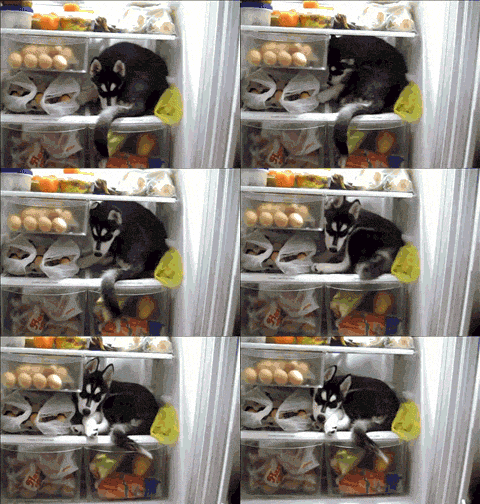
I have a lot of ideas, so much stuff I want to do. I am tracking four websites, an app, and two blogs. It seems like a lot of stuff to track in one board, but I needed to consolidate, because my number of boards was out. of. control. With the labels and some less than specific naming of columns, I am able to track all of my posts (I draft in the card descriptions), bugs, features, and things that are done or published. But some of this I want to keep private while I'm still working on it, so here is a cute gif of a husky (like Taco!) in the fridge instead of a screenshot of the board:
It's a system I refined frequently. As I write this, I'm thinking about different ways to make parent/child relationships clearer. A problem I've tackled at work, and talked about here.
My main problem is that I have all these ideas, and no where near enough time to do them all. So, if Trello could come up with a way to increase the hours in the day, I would be most grateful.
**I was not asked to write or compensated in any way by Trello for this series. I just love Trello that. much.**
Tuesday, June 16, 2015
Trello Bytes2 - TV and Movies!
I use Trello. A lot. At work, at home, any possible way that I can use it, I do. And I preach (annoying, I know) the amazingness of Trello to everyone I meet. I have seven boards on my personal Trello account. Yes, you read that right. I have seven.
This is a short series of how I use Trello to over organize my life. Part 1.
A happy, and favorite, way that I am currently using Trello is to track all of the movies and TV shows that Clark and I have suggested to each other, that the other one needs to watch. We label based on what format we have to watch it in (DVD, bluray, Netflix, Google Play, etc), and members to indicate who owns it.
We're both Trello fanatics, and it works out pretty well for us. Fortunately, we've yet to abandon any show or movie as a bad job.
**I was not asked to write or compensated in any way by Trello for this series. I just love Trello that. much.**
Tuesday, June 9, 2015
Trello Bytes - Insurance!
I use Trello. A lot. At work, at home, any possible way that I can use it, I do. And I preach (annoying, I know) the amazingness of Trello to everyone I meet. I have seven boards on my personal Trello account. Yes, you read that right. I have seven.
This is a short series of how I use Trello to over organize my life.
Last week I read this post and promptly freaked. out. I couldn't believe I had never thought to track my possessions in a Trello board. After a break in at a rental on the crappy side of town, I started a google spreadsheet that I used to track my stuff. Trying to figure out what was missing was a nightmare, so after that, tracking became more important than it had before. A small peace of mind that I couldn't get any other way. Although, I haven't done great at keeping it up to date.
Trello made it suuuuuper easy to transfer everything over, with added awesomeness. First, with carriage return separated items - like you get from copying a column in a spreadsheet - you can add multiple cards in a column in one go. I made each column a room in my house, and each card an item that generally lives in that room. Now, in addition to knowing the item, how many I have, cost, etc, I can also include a photo(!!!!) of the item(s), a scanned copy of the receipt, and all kinds of other goodness! It will take awhile to get the cards updated with the extra info I can now add, but I am so excited.
I also added a column to track items I donate through the year, and a column for when I've loaned something to someone. The donation column will be used to itemize my deductions, then archived at the end of each year, and a new one will take its place. All the tracking! ... It's so pretty....
It's not just my experience with B&Es that caused me to finally dedicate the time to cataloging. A friend had a traumatic experience of a house fire, in which she lost everything. Trying to remember all of my stuff in the house while dealing with that kind of loss seems like an less than desirable situation.
Plus, it might be a way for small way for me to procrastinate on certain things that I don't feel like doing just yet.
**I was not asked to write or compensated in any way by Trello for this series. I just love Trello that. much.**
Saturday, November 8, 2014
Creating A Website - My Adventure with Launching NextJen Mobile
My very first website was horribly designed, did absolutely nothing, and thankfully, no longer exists. I had a lot of help with that site, I didn't do any of the hosting things myself. I was 18, and still not sold on the technology thing as a career. I was fully invested in becoming an athletic trainer for the Detroit Red Wings, so I didn't give it much thought. Even though it wasn't a great site, I did learn a lot.
I've built a couple other half-assed attempts at sites since then, but nothing I ever actually put out on the web. I have a couple blogs (including this one) and I've done a lot of customizing on one of them. It's not quite the same as building from scratch, which I enjoy, though I frequently sit and stare at a blinking cursor before at least some of it starts to just flow out of me. Google and StackOverflow are still my best friends, like just about every developer on the planet.
I've been so busy with other projects, work, and life in general, I just haven't had the energy until this week. But on Monday, I finally put the black and white sketches for NextJen Mobile that I've had for a few months into 0s and 1s.
Looking at these sketches, I thought purple (my favorite color) would be the color scheme for the site design. But, it was hard to find a main shade that didn't make me want to kick something. I decided to take a very scientific approach to picking my new scheme: clicking around on a color wheel until I found one that I liked. I ended up with a darker denim-ish, teal-y blue, that I really liked for my main color (#00679B, in case you're wondering).
Once that was done, the biggest question was, what should my logo be? I was drawing so many blanks. I had zero ideas. Then I had one that sucked.
At least it was something though. I figured that I could get the site out there, and figure out a better logo later. Then I got really lucky when a friend of mine, Clark Rasmussen, who is way better at logo design than I am, pinged me saying that he had an idea for my logo.Once he writes up his post on the work he did with it, I'll link to it here. Edit: He has since written about the design for this logo, and the design of the new MIRide logo here.
Way better, am I right?! Thank goodness for more talented friends. With an awesome logo, I was finally at the step of actually releasing this to the web. Like I mentioned earlier, I've never actually done this part on my own, so I was nervous.
First thing I did was ask around at work about hosting services. One of my coworkers mentioned that a different coworker raves about NearlyFreeSpeech.net. After poking around a bit, I decided to move forward with them. I trust both coworkers' judgement, they are both incredibly smart, so the choice was not difficult.
So far, I have been very pleased with them. Set up was simple, the FAQ was very helpful when I ran into problems, as well as suggestions for SFTP tools. I use WinSCP at work, but I have a mac at home, so obviously that was not an option for me. I downloaded Fugu, a free mac equivalent to only be informed by Elphaba that mac doesn't support PowerPC apps any more, so that was not a choice for me. Transmit4 had a seven day free trial, so I gave it a shot. I was very pleased with the UI and the experience I had with them last night. (Because I had to upload new files a couple times to fix things that I may or may not have forgotten to do during the initial building... oops).
Somethings that I discovered while putting my site on the web last night:
Anyway, I have learned a lot during this experience, and I'm already thinking about how I can apply what I've learned to a few other projects I have in the pipes. I'm retro-ing on myself, if you will. This is one awesome adventure and I'm looking forward to the next step on the path.
I've built a couple other half-assed attempts at sites since then, but nothing I ever actually put out on the web. I have a couple blogs (including this one) and I've done a lot of customizing on one of them. It's not quite the same as building from scratch, which I enjoy, though I frequently sit and stare at a blinking cursor before at least some of it starts to just flow out of me. Google and StackOverflow are still my best friends, like just about every developer on the planet.
I've been so busy with other projects, work, and life in general, I just haven't had the energy until this week. But on Monday, I finally put the black and white sketches for NextJen Mobile that I've had for a few months into 0s and 1s.
Looking at these sketches, I thought purple (my favorite color) would be the color scheme for the site design. But, it was hard to find a main shade that didn't make me want to kick something. I decided to take a very scientific approach to picking my new scheme: clicking around on a color wheel until I found one that I liked. I ended up with a darker denim-ish, teal-y blue, that I really liked for my main color (#00679B, in case you're wondering).
Once that was done, the biggest question was, what should my logo be? I was drawing so many blanks. I had zero ideas. Then I had one that sucked.
At least it was something though. I figured that I could get the site out there, and figure out a better logo later. Then I got really lucky when a friend of mine, Clark Rasmussen, who is way better at logo design than I am, pinged me saying that he had an idea for my logo.

Way better, am I right?! Thank goodness for more talented friends. With an awesome logo, I was finally at the step of actually releasing this to the web. Like I mentioned earlier, I've never actually done this part on my own, so I was nervous.
First thing I did was ask around at work about hosting services. One of my coworkers mentioned that a different coworker raves about NearlyFreeSpeech.net. After poking around a bit, I decided to move forward with them. I trust both coworkers' judgement, they are both incredibly smart, so the choice was not difficult.
So far, I have been very pleased with them. Set up was simple, the FAQ was very helpful when I ran into problems, as well as suggestions for SFTP tools. I use WinSCP at work, but I have a mac at home, so obviously that was not an option for me. I downloaded Fugu, a free mac equivalent to only be informed by Elphaba that mac doesn't support PowerPC apps any more, so that was not a choice for me. Transmit4 had a seven day free trial, so I gave it a shot. I was very pleased with the UI and the experience I had with them last night. (Because I had to upload new files a couple times to fix things that I may or may not have forgotten to do during the initial building... oops).
Somethings that I discovered while putting my site on the web last night:
- If an image is not visible on your site, but you have everything appropriately referenced, check the permissions in your public directory. In Transmit4 you can right click the file, hit 'Get Info', and you can edit the permissions in the resulting dialogue box. Crazily enough, the world has to have read permissions for them to be able to see the image.
- After pointing the domain at the correct DNS servers, my site still wasn't serving to the world. And I couldn't figure out why. Turned out the problem was that I was still on a free "check us out!" account, not a paid account. Once I was on a paid account, my site started working. Crazy how that works!
Anyway, I have learned a lot during this experience, and I'm already thinking about how I can apply what I've learned to a few other projects I have in the pipes. I'm retro-ing on myself, if you will. This is one awesome adventure and I'm looking forward to the next step on the path.
Tuesday, October 14, 2014
Re-post: Awesome Sauce Tinkering (Fondant Is Gross)
I wrote this post at my other blog, before I started this more tech related one, so here is a link to the original, and the post has been copied below in its entirety. This came back across my radar when I had to set up another inbox for another new email for me. (Don't ask).
Fondant Is Gross: Awesome Sauce Tinkering
-----
The things you discover when you noodle!
I have two gmail accounts and I have recently been using the second one a little bit more, such that, I have need to actually monitor it a little closer. For silly reasons, like people generally finding it rude if you ignore their emails and fail to respond for a month. (Shocking, I know!)
Although Google does have an "add an account" capability, that allows you to run two Google accounts in the same browser, there are some hiccups when it comes to using other Google services. I don't use the other services very often on this secondary email, so I wanted another solution that would do what I really want Google to do. What I want Google to do, is for a user to be able to use the multiple inbox feature to have multiple gmail inboxes in one screen, not just divide your inbox by labels, filters or what have you.
So. My solution.
First, I went into the settings[1] of the second email (example@gmail.com) and set up mail forwarding to the first email[2] (me@gmail.com). I also set up the forward to automatically mark forwarded email as read[3].
After following the steps to verify that I own both accounts, I set up a filter in me@gmail.com with the "to" parameter as the address of the example@gmail.com. This filter automatically labels all forwarded email and archives it as soon as it hit my inbox.
Make sure you select to apply the filter to however many matching conversations have already been forwarded from example@gmail.com, or you're not going to do an easy search based on the label/filter later.
Here is where the magic happens. Enter settings, labs, and enable multiple inboxes on me@gmail.com. You should look through some of the other really cool stuff the labs team has done. Like, ridiculous amounts. I'll wait. Ok, now, make sure you scroll all the way to the bottom and click save.
Then, go back into settings at the "Multiple Inboxes" tab and delete the automatic fields that are there and enter label:example in Panel 0. I want the second inbox to be below my me@gmail.com inbox, so I select that option and click save.
Then more magic happens. Click on "Accounts and Import." Then under "Send mail as" I added example@gmail.com, and verified (again) that I owned the accounts I was trying to send mail as. After that is verified, then a fancy little thing shows up.
You can reply from the email that the message was sent to. So, for instance, I get an email to example@gmail.com, and I get it at the me@gmail.com address through the system I just set up. I can click reply while still in the me@gmail account, and it will send the email as though I am signed in as example@gmail. Without signing into the other account. Ever. Brilliant. And, if you click compose, in the "from" field, it automatically enabled a drop down that allows you to choose which email address you want to send the email from.
There are still some issues to work out, for example, handling the email that is sitting in example@gmail.com, marked as read. I suppose it will have to be a learning process where I add filters for incoming mail as I get it, so gmail can delete it if it's X, or archive it if it's Y, but once that is all settled, it's going to be a nice little operation.
Another issue is that the only way for me to no longer see the messages in the second inbox for example@gmail.com that I have read is to delete the label that was assigned to them upon landing in my inbox, or delete the email itself, which I may not want to do.
Google does all kinds of awesome stuff, so hopefully they will come up with a solution for the issue. Or just make this work-around redundant by enabling what I just did with two clicks and a verification in multiple inboxes!
---
Speaking of awesome, have you checked out Google Keep yet? It's like Evernote and Google Tasks had a baby.
---
More awesome is the program that I used to create these screenshots, Snagit.
Full disclosure, Adam works at TechSmith, and Snagit was used for the creation of these lovely screen shots. The heinous editing is all mine, however, and I was not compensated in anyway for this post by Google or TechSmith for the use of Snagit or the plugging of their stuff. I just think it's awesome.
---
More disclosure, I also work at TechSmith. And I still love Google Keep. Some of the improvements they've made are AWESOME.
Fondant Is Gross: Awesome Sauce Tinkering
-----
The things you discover when you noodle!
I have two gmail accounts and I have recently been using the second one a little bit more, such that, I have need to actually monitor it a little closer. For silly reasons, like people generally finding it rude if you ignore their emails and fail to respond for a month. (Shocking, I know!)
Although Google does have an "add an account" capability, that allows you to run two Google accounts in the same browser, there are some hiccups when it comes to using other Google services. I don't use the other services very often on this secondary email, so I wanted another solution that would do what I really want Google to do. What I want Google to do, is for a user to be able to use the multiple inbox feature to have multiple gmail inboxes in one screen, not just divide your inbox by labels, filters or what have you.
So. My solution.
First, I went into the settings[1] of the second email (example@gmail.com) and set up mail forwarding to the first email[2] (me@gmail.com). I also set up the forward to automatically mark forwarded email as read[3].
After following the steps to verify that I own both accounts, I set up a filter in me@gmail.com with the "to" parameter as the address of the example@gmail.com. This filter automatically labels all forwarded email and archives it as soon as it hit my inbox.
Make sure you select to apply the filter to however many matching conversations have already been forwarded from example@gmail.com, or you're not going to do an easy search based on the label/filter later.
Here is where the magic happens. Enter settings, labs, and enable multiple inboxes on me@gmail.com. You should look through some of the other really cool stuff the labs team has done. Like, ridiculous amounts. I'll wait. Ok, now, make sure you scroll all the way to the bottom and click save.
Then, go back into settings at the "Multiple Inboxes" tab and delete the automatic fields that are there and enter label:example in Panel 0. I want the second inbox to be below my me@gmail.com inbox, so I select that option and click save.
Then more magic happens. Click on "Accounts and Import." Then under "Send mail as" I added example@gmail.com, and verified (again) that I owned the accounts I was trying to send mail as. After that is verified, then a fancy little thing shows up.
You can reply from the email that the message was sent to. So, for instance, I get an email to example@gmail.com, and I get it at the me@gmail.com address through the system I just set up. I can click reply while still in the me@gmail account, and it will send the email as though I am signed in as example@gmail. Without signing into the other account. Ever. Brilliant. And, if you click compose, in the "from" field, it automatically enabled a drop down that allows you to choose which email address you want to send the email from.
There are still some issues to work out, for example, handling the email that is sitting in example@gmail.com, marked as read. I suppose it will have to be a learning process where I add filters for incoming mail as I get it, so gmail can delete it if it's X, or archive it if it's Y, but once that is all settled, it's going to be a nice little operation.
Another issue is that the only way for me to no longer see the messages in the second inbox for example@gmail.com that I have read is to delete the label that was assigned to them upon landing in my inbox, or delete the email itself, which I may not want to do.
Google does all kinds of awesome stuff, so hopefully they will come up with a solution for the issue. Or just make this work-around redundant by enabling what I just did with two clicks and a verification in multiple inboxes!
---
Speaking of awesome, have you checked out Google Keep yet? It's like Evernote and Google Tasks had a baby.
---
More awesome is the program that I used to create these screenshots, Snagit.
Full disclosure, Adam works at TechSmith, and Snagit was used for the creation of these lovely screen shots. The heinous editing is all mine, however, and I was not compensated in anyway for this post by Google or TechSmith for the use of Snagit or the plugging of their stuff. I just think it's awesome.
---
More disclosure, I also work at TechSmith. And I still love Google Keep. Some of the improvements they've made are AWESOME.
Friday, October 10, 2014
Lessons Learned: Trello Edition
It's been a long, long while since my last post, but I recently gave a talk on the lessons we learned using the API that Trello provides. These are broad lessons about what would make Trello work for our team better, and how we hope to move forward.
This talk was given at TechSmith's internal conference, ReCon, on 6 October 2014. The blurred out sections are just me covering my own bum, and protecting TechSmith's interests.
If you would like to get more information on the code we wrote, you can go here, here, here, and see Clark's talk here.
Enjoy!
Subscribe to:
Posts (Atom)